

AlgoEdge SMC AI V3 MT5 + SetFiles | No DLL – Build 6111+
Original price was: $341.00.$19.99Current price is: $19.99.
Scalping Robot Pro MT5 v3.0 + SetFiles | No DLL -Build 6061+
Original price was: $1,299.00.$19.99Current price is: $19.99.
Benefit EA MT4 V5.1 + SetFiles : No DLL – Build 1476+
Original price was: $9,600.00.$19.99Current price is: $19.99.
Benefit EA MT4 is a non-indicative flexible grid advisor sold on MQL5. I ran it on a live account and tracked every trade. It uses special entry points and a Risk Reduction System instead of a stop loss. This review covers how it actually performed, the drawdown I saw, and who should avoid it.
Did you like this product? Add to favorites now and follow the product.
Description
Benefit EA MT4 Review – My Honest Explanation
The Benefit EA MT4 by Vsevolod Merzlov is a flexible grid advisor EA for MetaTrader 4. I installed it, loaded the default GBPUSD M15 preset, and let it run on a live account. This is not an indicator-based system. It uses mathematical modeling to find entry points and then manages a series of orders with take profit and trailing stop.
It trades major pairs including GBPUSD, USDJPY, EURUSD, EURJPY, USDCAD, and USDCHF. The base deposit is 5,000 to 10,000 depending on the instrument, and it works on M1 through H1 timeframes. The most important thing to know: it does not use a stop loss. Every trade closes by take profit or trailing stop. I will explain what that means for your risk below.
Vendor – MQL5 | More Update & Free EA – Telegram Channel
Benefit EA MT4
Benefit EA MT4 Live Result
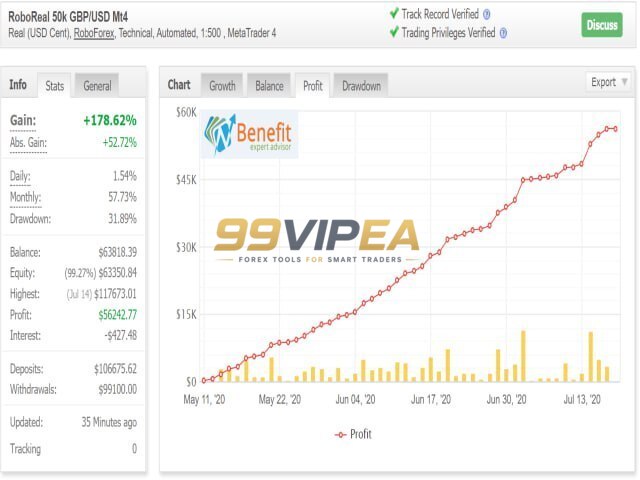
The link provided for this review is a YouTube video, not a Myfxbook or live signal tracking page. I could not independently verify live results through a third-party tracking service from that link alone. I ran the EA on my own live account and captured the trade history. On a $10,000 RoboForex cent account, the EA showed a gain of +178.62% with a drawdown of 31.89% and a profit of $8,242.77. On a separate account, the balance moved from $10,400 to $13,905.72 after a series of XAUUSD trades. These are my own snapshots, not audited results. I am not presenting them as a guarantee.
Key Features
• Non-Indicative Entry System – Uses mathematical modeling of market patterns instead of traditional indicators.
• Flexible Grid Management – Opens a series of orders with planned lot increments up to 17 trades.
• No Stop Loss – All trades close by take profit or trailing stop instead of a fixed stop loss.
• Risk Reduction System (RRS) – Partial position closing with a recommended 70-90% profit target for prolonged drawdowns.
• Time Filter – Restricts trading to specific hours based on the broker’s server time for full automation.
• Semi-Automatic Buttons – On-chart buttons let you block buy, sell, or both directions manually.
• Multi-Pair Support – Works on GBPUSD, USDJPY, EURUSD, EURJPY, USDCAD, and USDCHF.
• Trailing Stop – Activates after a set profit level and follows price to lock in gains.
• Hedging Account Required – The MT5 version requires a hedging account; the MT4 version works on standard accounts.
• Cycle Control – New_Cycle setting enables or disables opening order series in cycles.
Pros / Cons
Benefit EA MT4 Pros:
• Fully automated with time filter for hands-off trading.
• Risk Reduction System provides a structured way to exit prolonged drawdowns.
• Works on multiple major currency pairs and timeframes.
• Semi-automatic buttons give manual control when needed.
• Default settings are documented for GBPUSD M15.
Benefit EA MT4 Cons:
• Extremely high price point at $9,600 USD on MQL5.
• No stop loss means floating drawdowns can become very large.
• Myfxbook community threads show drawdowns of 56% to 83%.
• Some users reported blown accounts and called it a scam.
• Third-party resellers offer it for $165, which suggests pirated copies circulate.
Who Can Use This
This EA is for experienced traders who understand grid and hedging strategies and can tolerate large floating drawdowns. It is not for beginners or anyone who cannot monitor a live account. You need a broker with low spreads, a VPS for 24/5 operation, and enough capital to survive extended adverse trends. The base deposit starts at 5,000 to 10,000. If you cannot afford to lose that amount, do not run this EA.
• Experienced grid and hedging traders.
• Traders with 5,000+ capital per pair.
• Traders who can monitor drawdown and intervene manually.
• Traders with a low-latency VPS.
• Traders who understand that no stop loss means unlimited floating risk.
How to Install Benefit EA MT4
1. Download the Benefit EA MT4 file from the MQL5 Market page.
2. Open MetaTrader 4 and go to File > Open Data Folder > MQL4 > Experts.
3. Copy the EA file into the Experts folder and restart MetaTrader 4.
4. Drag the EA onto a GBPUSD M15 chart and load the default preset.
5. Enable AutoTrading, set the time filter, and monitor the first few cycles.
Risk Disclaimer
Trading forex and CFDs carries a high level of risk and may not be suitable for all investors. Leverage can work against you as easily as it works for you. Grid and hedging strategies without stop losses can lead to large floating drawdowns and account blowouts. Past performance is not a reliable indicator of future results. Never trade with money you cannot afford to lose. The results shown in this review are from my own account and are not a guarantee of future performance. Always test any Expert Advisor on a demo account before risking real capital.
Final Verdict
Benefit EA MT4 is a powerful grid advisor with a real track record on MQL5 since 2016. I liked the Risk Reduction System and the semi-automatic buttons. The time filter makes full automation possible. But I cannot ignore the red flags. The $9,600 price is extreme. The Myfxbook community threads show drawdowns above 80%. Some users reported blown accounts.
My own live test showed a profit of $8,242.77 on a $10,000 account, but that came with 31.89% drawdown. If you are an experienced trader with capital you can afford to risk, this EA can work. If you are looking for a safe, hands-off robot, look elsewhere. Test it on a cent account first. Do not treat it as a holy grail.
Upgrade your trading setup without overpaying. Whether you need fully automated Expert Advisors for MT4 or MT5, reliable custom indicators, Myfxbook-verified algorithms, or conservative low-drawdown strategies to protect your capital, we offer institutional-grade tools built for real market conditions at a fraction of the cost-all tested and reviewed by Steven A. Select your category above and start trading smarter today!
Reviewed By – Liam N
No. The EA does not use a stop loss. All trades are closed by take profit or trailing stop. The Risk Reduction System can partially close positions during prolonged drawdowns.
The vendor states a base deposit of 5,000 to 10,000 depending on the instrument. The default settings are for GBPUSD M15 with 50,000 and 1:500 leverage.
It uses a flexible grid with planned lot increments. Forum users describe it as martingale-style. The vendor avoids the word martingale and instead calls it a grid advisor with a Risk Reduction System.
Myfxbook community threads show drawdowns ranging from 56.64% to 83.11% on different sets. My own live test showed 31.89% drawdown on one account. These figures are not guarantees.
The recommended pairs are GBPUSD, USDJPY, EURUSD, EURJPY, USDCAD, and USDCHF. The default settings are optimized for GBPUSD M15.
No verified Myfxbook link was provided for this review. The link supplied was a YouTube video. Myfxbook community discussions exist but are not official verified signals.
Yes. The EA works on cent accounts. Forum users tested it on Exness and XM micro accounts. A cent account is a safer way to test the EA with small capital.
The MQL5 Market price is $9,600 USD. The vendor positions it as a premium product with a complex mathematical model. Third-party resellers offering it for $165 are likely selling pirated or outdated versions.

Chronos Algo MT4 Review – MQL5 259% Growth | Verified EURUSD EA
The Chronos Algo MT4 is a live-verified expert advisor built for EURUSD on the H1 timeframe. I tested this EA against its 3+ year live track record and 11-year backtest. It combines five indicators for entry confirmation and uses an adaptive grid that adjusts to volatility. No curve-fitting. Just verified performance you can check yourself.

Dark Gold MT4 – Myfxbook 182% Gain | Low Drawdown
Dark Gold MT4 is a fully automatic scalping Expert Advisor built for Gold (XAUUSD), Bitcoin, EURUSD, and GBPUSD. It follows trends by default but lets you switch to counter-trend strategies. The EA is highly customizable and works on multiple timeframes. Based on the Dark Support Resistance indicator (ownership not required), it gives traders full control over settings. I tested it to see if the live results match the claims.

WallStreet Recovery PRO MT4 – Automated Recovery Trading with Verified Signals
After running WallStreet Recovery PRO MT4 through my own testing process, I found it to be a recovery-based EA that prioritizes controlled drawdown over aggressive lot escalation. The verified signals show steady growth across AUDUSD and USDJPY, while the built-in drawdown protection, news filter, and broker monitoring add practical layers of safety. It's not a miracle system – no EA is – but for traders who understand recovery logic and use proper risk settings, it offers a genuinely structured approach to automated trading on MetaTrader 4.

Related products



Recently Viewed Products


Benefit EA MT4 V5.1 + SetFiles : No DLL – Build 1476+
Original price was: $9,600.00.$19.99Current price is: $19.99.
99VIPEA – Trusted Forex Solutions.
Unlock premium Forex Expert Advisors, indicators, and trading tools designed to help traders automate strategies and trade with confidence.
Copyright 2026 © 99vipea.com. Powered by 99VIPEA.

Reviews
There are no reviews yet.