
Forex EA Guide 2026 – What It Is & How to Start
What Is a Forex EA? Beginner’s Guide to Automated Trading (2026)
A forex EA is software that trades for you inside MetaTrader but it is only as good as the rules and risk controls behind it. If you have ever wondered whether a trading robot can really replace screen time, this beginner’s guide gives you the honest answer for 2026.
Forex trading has always demanded attention. Price moves around the clock, sessions overlap, and emotional decisions can undo weeks of careful planning. A forex EA short for Expert Advisor promises a different way: a program that watches the market, reads price data, and executes trades according to rules you or a developer define. The concept is simple, but the reality is more nuanced. An EA can remove hesitation and execute a strategy with machine-like consistency, yet it cannot think, adapt to a surprise central-bank announcement, or guarantee a profit.
In 2026, automated trading is more accessible than ever. The MetaTrader ecosystem remains the dominant home for EAs, with MetaTrader 4 (MT4) and MetaTrader 5 (MT5) hosting thousands of free and commercial robots. New tools, including AI-assisted strategy builders, have lowered the barrier to entry, but they have also made due diligence more important than ever. A poorly chosen or poorly configured EA can lose money just as quickly as an undisciplined manual trader sometimes faster, because it does not pause to reconsider.
This guide explains what a forex EA is, how it works, the main types available, how to install and test one safely, and the risks every beginner should understand before connecting a robot to a live account.
👉 Best Fore EA: Available on the Download
👉 Telegram Support and Free EA: Join for updates, announcements, and support
What Is a Forex EA (Expert Advisor)?
A forex EA is an automated trading program that runs inside the MetaTrader platform and places, manages, and closes trades according to coded rules. The term “Expert Advisor” comes from MetaQuotes Software, the company behind MetaTrader. The “expert” label describes the software’s ability to execute a strategy automatically—not a promise of expertise or profitability.
EAs are written in MQL4 for MT4 and MQL5 for MT5. MQL4 is simpler and event-driven, while MQL5 is object-oriented and designed for more complex, multi-asset programs. The two languages are not cross-compatible: an EA built for MT4 will not run on MT5, and vice versa. Traders can build their own EA, buy one from the MQL5 Marketplace, or download free versions from developer communities.
The key distinction is between automation and strategy. Automation is the delivery mechanism; strategy is the logic. An EA does not invent an edge—it executes the edge its developer programmed into it. If the underlying strategy is weak, automation only makes the losses arrive more efficiently.
How Does a Forex EA Work?
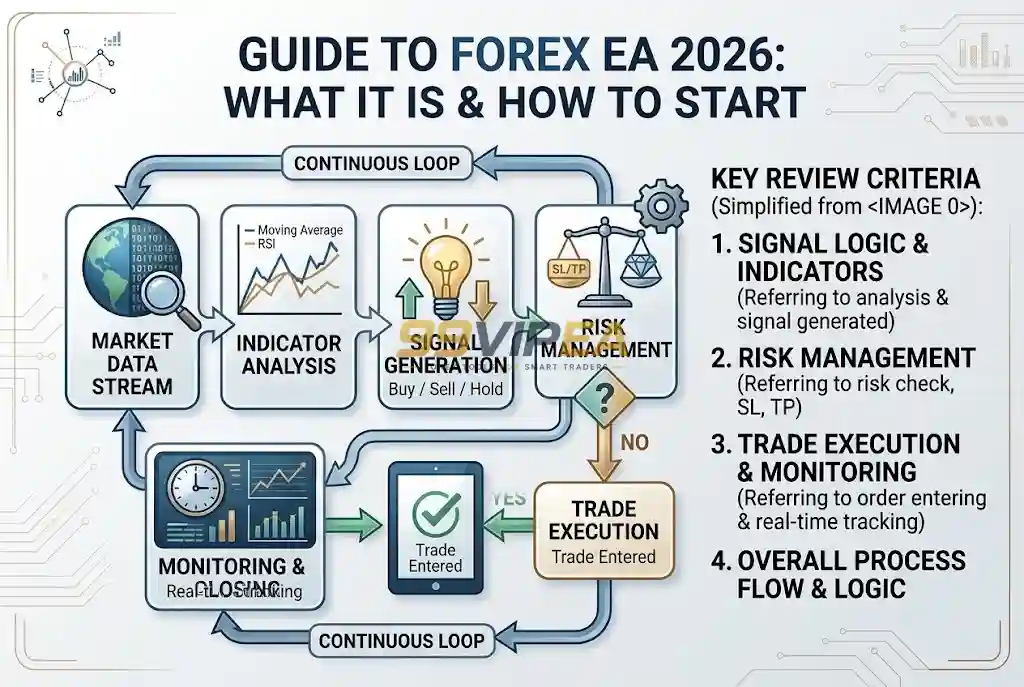
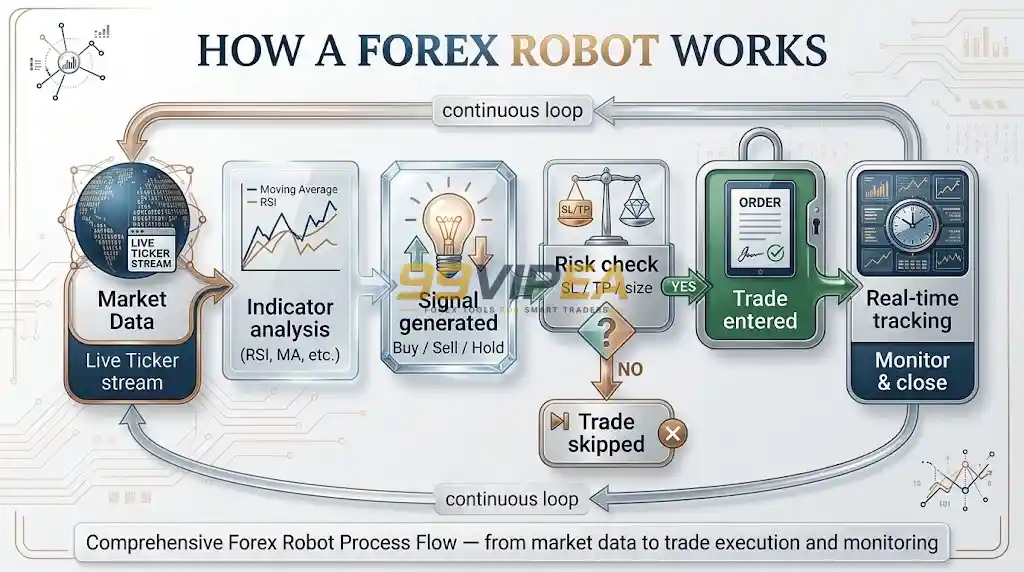
An EA is best understood as a rules engine. A developer defines entry logic, exit logic, position sizing, and risk controls, then compiles that logic into a file the MetaTrader platform can run. Once the EA is attached to a chart and automated trading is enabled, it reads incoming price data tick by tick and acts the moment its conditions are satisfied.
Most EAs perform three core jobs:
Signal generation – scanning indicators such as moving averages, RSI, MACD, or price structure to decide when to trade.
Execution – sending the buy or sell order to the broker and attaching stop-loss and take-profit levels.
Trade management – trailing stops, scaling positions, or closing trades when a drawdown limit is reached.
The technical cycle repeats continuously: the EA collects price and indicator data, evaluates its rules, sends an order if conditions are met, manages the open position, and closes the trade when an exit condition appears.
A critical limitation is that an EA only runs while MetaTrader is open and connected to the broker’s server. If your computer shuts down, the internet drops, or the platform crashes, the EA stops operating and open positions may be left unmanaged. This is why many serious EA users run their terminals on a Virtual Private Server (VPS) so the robot can operate continuously through the trading week.
MT4 vs MT5 for Forex EAs
Both platforms run EAs, but they suit different needs. MetaTrader 4 (MT4) is forex-focused and has a vast library of existing MQL4 EAs. MetaTrader 5 (MT5) offers faster, multi-threaded backtesting, multi-asset support, and more advanced optimization tools. Beginners trading mainly currency pairs may find MT4 simpler; traders who want broader testing and multi-market capability should lean toward MT5.
Types of Forex EAs
EAs are usually grouped by the strategy they automate. The risk sits with the strategy, not with automation itself. Understanding the main categories helps you evaluate what a robot is actually doing and when it is likely to struggle.
1. Trend-Following EAs
Trend-following EAs enter in the direction of an established move, often using moving averages, ADX, or MACD to identify momentum. They can perform well in strongly trending markets but may generate false signals and losses during range-bound conditions. These EAs typically accept a lower win rate in exchange for larger winning trades when a trend persists.
2. Scalping EAs
Scalping EAs execute high-frequency trades targeting small price movements, often holding positions for seconds or minutes. They depend on low spreads and fast execution. A scalping EA that performs well on a raw-spread account can deteriorate quickly on a higher-cost account or during volatile news periods.
3. Grid and Martingale EAs
Grid EAs place buy and sell orders at predetermined intervals, building a position as price moves against them. Martingale EAs increase position size after a loss. Both approaches can produce smooth equity curves for extended periods—and both carry the risk of catastrophic drawdown when a market moves in one direction without retracing. These strategies are popular because they often show high win rates, but the risk profile is asymmetric: many small gains can be erased by a single sustained move.
4. News and Event-Driven EAs
Some EAs trade around economic releases, using volatility filters or straddle logic. They can capture sharp moves, but slippage, widened spreads, and execution delays around news events make results highly broker-dependent.
5. AI-Enhanced EAs
A growing category in 2026 uses machine-learning models or adaptive filters to adjust parameters as market conditions change. These EAs may appear more flexible, but they are not immune to overfitting or regime shifts. The same due-diligence rules apply: live verified performance matters more than a backtest curve.
How to Install a Forex EA on MT4 or MT5
Installation is straightforward, but the sequence matters. The standard method is consistent across most brokers:
Open the MetaTrader platform and select File → Open Data Folder.
Navigate to MQL4 → Experts (for MT4) or MQL5 → Experts (for MT5).
Copy the EA file (usually an
.ex4or.ex5file) into the Experts folder.Restart MetaTrader or refresh the Navigator panel.
Drag the EA onto a chart, configure the input parameters, and enable Algo Trading / Automated Trading.
Before going live, always run the EA on a demo account for at least several weeks. Demo forward-testing reveals how the EA behaves under live spreads, execution speed, and swap conditions—factors a historical backtest cannot fully replicate.
Backtesting and Optimisation: The Step Beginners Skip
Backtesting runs an EA against historical price data to estimate how its rules would have performed. MT4’s Strategy Tester is single-currency; MT5’s tester is multi-threaded and can test multiple symbols and timeframes simultaneously, making optimisation faster. AvaTrade notes that MetaTrader’s testing tools allow traders to simulate systems against historical data and identify weaknesses before risking capital.
But backtesting has a well-known trap: over-optimisation. If you tune an EA’s parameters until it produces a perfect historical equity curve, you are often fitting the robot to the past rather than preparing it for the future. A backtest with unusually high returns and an unusually smooth curve should be treated with suspicion, not excitement. The more parameters an EA exposes, the greater the risk of curve-fitting.
A practical routine is to:
Test on out-of-sample data—a period the EA was not optimised on.
Check performance across multiple market regimes (trending, ranging, high volatility, low volatility).
Use realistic spreads and commissions, not the default zero-cost assumptions.
Compare backtest results with live verified performance on a platform such as Myfxbook or FX Blue.
Pros and Cons of Forex EA Trading
Advantages
Emotion removed from execution. An EA does not hesitate, revenge-trade, or move a stop-loss out of fear. It follows its rules.
Speed and consistency. It can react to price conditions in milliseconds and monitor multiple pairs simultaneously.
24-hour coverage. Within the trading week, an EA can operate across sessions without fatigue, provided the platform remains connected.
Discipline at scale. Once configured, the EA applies the same risk rules to every trade, which can be valuable for traders who struggle with consistency.
Disadvantages
No contextual judgement. An EA cannot recognise a geopolitical shock, a central-bank intervention, or a sudden change in market sentiment unless those conditions are explicitly coded.
Technical dependency. Power cuts, internet outages, platform crashes, and broker-side execution issues can interrupt operation.
Over-optimisation risk. A robot that looks exceptional in a backtest may fail in live conditions.
Overtrading and hidden risk. Some EAs generate high trade volumes or use grid/martingale logic that conceals risk until a sustained trend exposes it.
The honest conclusion is that an EA is a tool, not a substitute for trading knowledge. It can improve execution and consistency, but it cannot remove market risk or compensate for a poorly designed strategy.
How to Choose a Reliable Forex EA
Choosing an EA is closer to hiring an employee than buying a consumer product. You need evidence, not marketing claims. Use the following checklist before committing capital.
1. Verified live performance, not just backtests. Look for a verified track record on Myfxbook, FX Blue, or the MQL5 signal service. A backtest is a hypothesis; live verified data is evidence. Pay attention to the length of the track record and whether the account has survived different market conditions.
2. Understand the strategy. If the vendor cannot explain the logic in plain language, treat that as a red flag. Ask whether the EA is trend-following, mean-reverting, breakout-based, or grid-based. Each has a different risk profile.
3. Check drawdown, not just profit. A high return with a 60% drawdown is not a beginner-friendly result. Many experienced EA users avoid robots with historical drawdowns above 30–40%, because recovery from a deep drawdown requires a disproportionately large gain.
4. Assess broker compatibility. EAs are sensitive to spreads, commissions, slippage, and execution speed. A scalping EA that performs on a raw-spread ECN account may underperform on a standard account. Some EAs are also sensitive to broker-specific settings such as FIFO rules or maximum lot limits.
5. Start small and forward-test. Even after a demo period, begin with the minimum viable position size. Scale only after the EA has demonstrated consistent behaviour on your broker and your VPS setup.
6. Avoid “guaranteed profit” claims. No legitimate EA can guarantee returns. Claims of fixed monthly percentages or “no-loss” systems are inconsistent with how leveraged forex trading works.
Popular Forex EAs in 2026 (Examples for Research)
The following EAs appear frequently in 2026 industry reviews. They are listed as research examples, not endorsements always verify current performance and risk disclosures yourself.
• PolyGold Scalper MT5 is a gold-focused scalping EA listed on 99vipea.com alongside set files for configuration. Gold scalping strategies depend heavily on spreads, execution speed, and broker conditions, so results can vary significantly between accounts. It is positioned as an MT5-only tool.
• Gold Trap MT5 is another gold-oriented EA available on the site, marketed as an unlimited license with free updates. “Gold trap” naming often signals a strategy designed to capture short-term gold movements, though the specific logic and risk controls require independent review.
• Gold Snap MT5 is a third gold-focused option on 99vipea.com, described as a no-DLL build for MT5. The recurrence of gold-specific EAs on the marketplace reflects a broader 2026 trend: traders are increasingly seeking automated tools tailored to XAUUSD volatility.
• Wave Rider EA MT5 is listed as a no-DLL EA for MT5 builds 6140 and above. The “wave rider” label typically suggests a momentum- or trend-following approach, though the vendor’s documentation should be consulted for the actual entry and exit rules.
• Squid Grid AI MT5 is explicitly framed as an AI grid system, and 99vipea.com describes it as an “honest test” listing. Grid EAs can produce smooth equity curves for extended periods, but they carry asymmetric tail risk when price moves persistently in one direction without retracing. Any grid-based EA should be evaluated with particular attention to maximum drawdown and exposure management.
• Institutional SMC Robot MT5 is marketed for prop-firm use and references “SMC” (Smart Money Concepts). Prop-firm compatibility claims should be tested carefully, because firms impose specific drawdown, consistency, and news-trading rules that an EA may or may not respect.
• ToTheMoon MT4 is listed as an MT4 EA with a “smart partial close” feature. Partial-close logic can help lock in gains, but it also changes the risk-reward profile of every trade; the EA’s behavior under different volatility conditions matters more than the feature name.
• My AI Gold MT5 and Aikon MT5 are further MT5 entries on the site, both associated with gold or broad forex automation depending on configuration. The “AI” and version-number branding common across these listings is a reminder that longevity of live performance, not version frequency, is the more useful filter criterion.
None of these EAs is a “set-and-forget” path to profit. 99vipea.com presents them as tools within a broader marketplace of expert advisors, indicators, and trading utilities. The appropriate research process remains the same: demand verified live track records where available, understand the strategy logic (trend, grid, scalping, or reversal), check drawdown rather than headline return, and forward-test on a demo account with the broker and VPS setup you intend to use. An EA listed on any marketplace including this one is a starting point for due diligence, not a substitute for it.
Frequently Asked Questions
1. What is a forex EA in simple terms?
A forex EA is a program that runs on MetaTrader and automatically opens, manages, and closes trades based on rules coded into it. It is often called a trading robot or expert advisor. It does not think like a human it follows instructions.
2. How do I install a forex EA on MT4?
Open MetaTrader, go to File → Open Data Folder, open MQL4 → Experts, copy the EA file into that folder, restart the platform, then drag the EA onto a chart and enable Algo Trading. For MT5, use the MQL5 → Experts folder instead.
3. Are forex EAs profitable?
Some EAs have produced profitable live track records, but profitability is never guaranteed. Results depend on the strategy, market conditions, broker execution, risk settings, and the discipline of the user. Many EAs that look profitable in backtests fail in live trading because of over-optimisation or changing market conditions.
4. What is the best forex EA for beginners in 2026?
There is no single “best” EA. Beginners should prioritise transparency, verified live performance, manageable drawdown, and broker compatibility over high advertised returns. Starting with a demo account and a small live position size is more important than choosing the most popular robot.
5. Can a forex EA run without a computer?
No, unless it is hosted on a Virtual Private Server (VPS). An EA requires MetaTrader to be running and connected to the broker’s server. If your computer shuts down or loses internet, the EA stops operating. A VPS keeps the terminal online continuously.
6. Do forex EAs work during news events?
Most EAs continue to operate during news, but execution conditions deteriorate: spreads widen, slippage increases, and order fills can be delayed. Some EAs include news filters; others do not. If an EA does not account for news volatility, consider pausing it around major releases.
7. What is the difference between MT4 and MT5 EAs?
MT4 EAs are written in MQL4, while MT5 EAs use MQL5. The languages are not cross-compatible. MT5 offers faster multi-threaded backtesting and broader multi-asset support; MT4 remains popular for forex-focused EAs and has a larger library of existing MQL4 robots.
Conclusion
A forex EA is a powerful automation tool, but it is not a shortcut to effortless profits. It can execute a strategy with speed, consistency, and emotional detachment qualities that many manual traders struggle to maintain. Yet it cannot interpret a surprise news event, adapt to a regime change, or protect you from a flawed strategy. The difference between a useful EA and an expensive lesson usually comes down to research, realistic expectations, and disciplined risk management.
If you are considering automated trading in 2026, start with education and demo testing. Choose an EA whose logic you understand, verify its live performance rather than trusting backtests alone, and begin with risk capital you can afford to lose. Automation works best when it supports a sound strategy not when it replaces one.
Ready to explore automated trading? Open a demo account on MT4 or MT5, install a free or trial EA, and observe how it behaves through different sessions before committing real capital.

99VIPEA – Trusted Forex Solutions.
Unlock premium Forex Expert Advisors, indicators, and trading tools designed to help traders automate strategies and trade with confidence.
Copyright 2026 © 99vipea.com. Powered by 99VIPEA.
